
Comparison

Open source Photoshop alternatives

PhotoCraft is the newest name in this category. GIMP, Krita and a handful of smaller projects cover the rest. Here is how they actually compare.

Why this category is suddenly crowded

In September 2026 the PhotoCraft repository appeared on GitHub and passed eighty thousand stars within weeks, pulling a wave of search interest behind it. It is a clean-room reimplementation of Photoshop written in pure Rust, and its arrival pushed a familiar question back to the top of search results: what open-source editors can actually replace Photoshop?

The honest answer is that "open source Photoshop alternative" is not one product but a small field. Each tool covers a different slice of what Photoshop users actually need, and none of them is a perfect match. This page compares the credible options as of late 2026.

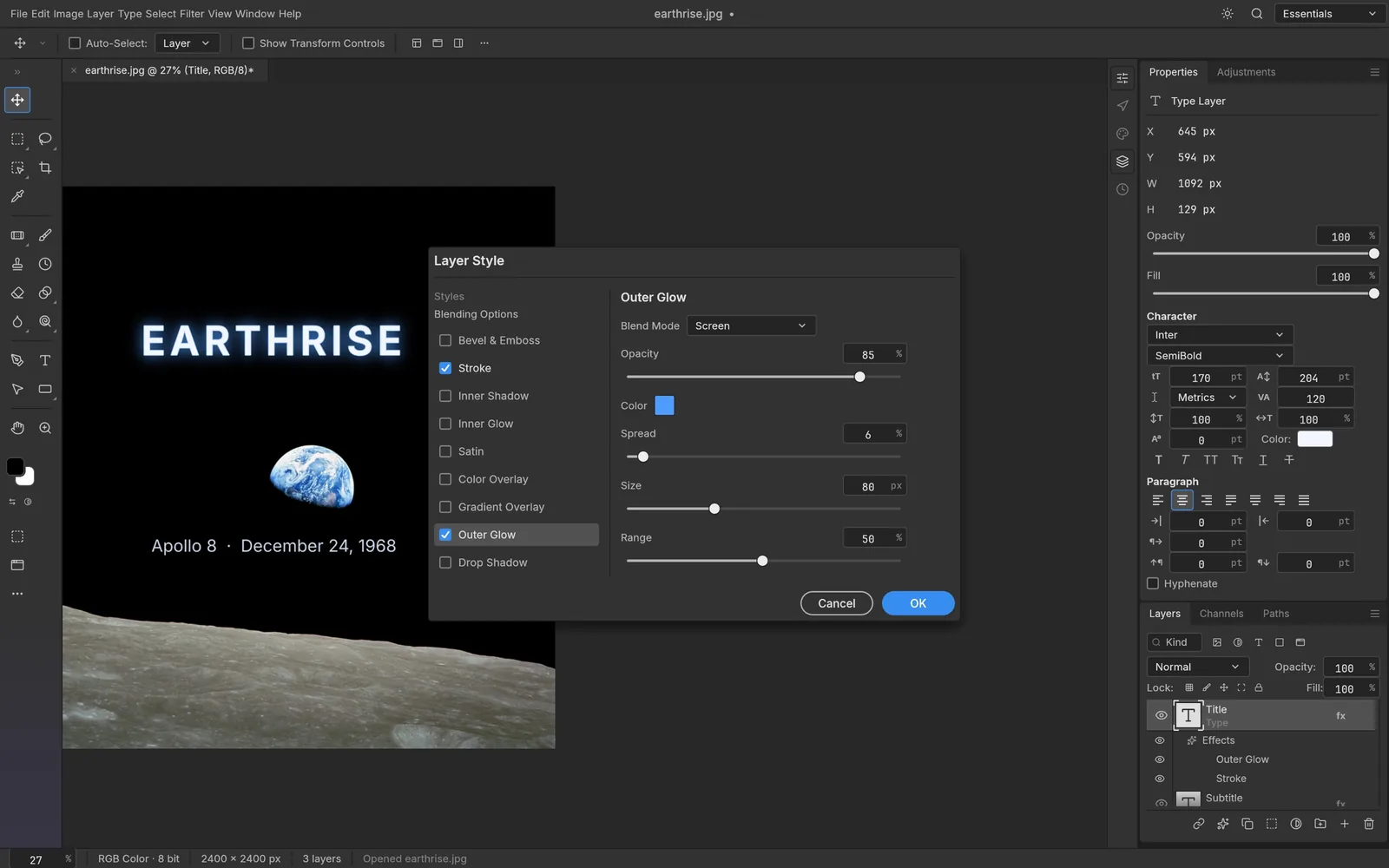
PhotoCraft layer styles panel with a live document on screen
The category is young: PhotoCraft reached eighty thousand GitHub stars within weeks of its September 2026 release.

The alternatives at a glance

Every tool below is genuinely open source. Where a tool is behind on a specific point, that is stated rather than smoothed over.

ToolLicenseBest forPSD filesPlatformsMaturity
PhotoCraftMIT / Apache-2.0Photoshop-shaped editing: layers, masks, adjustment layers, real PSD round trips, CLI and MCP automationReads and writes real PSD/PSB; 307 of 309 psd-tools test files re-save faithfullymacOS, Windows, Linux, FreeBSD, WebAssembly in the browserEarly alpha, very active development
GIMPGPL-3.0 (libraries LGPL)General-purpose raster editing and photo retouching with the longest track recordOpens and exports PSD through its own import/export path, with known fidelity limitsWindows, macOS, LinuxMature, decades of releases
KritaGPL-3.0Digital painting and illustration rather than photo retouchingLimited PSD support; it is a painter firstWindows, macOS, LinuxMature and stable
CompositorMITmacOS users who want Photoshop's panels, shortcuts and PSD workflow replicated closelyNative PSD/PSB round-trip as a stated design goalmacOS (Apple Silicon and Intel)New project, fast-moving
PintaMITQuick, simple edits without a learning curveNot a PSD workflow toolWindows, macOS, LinuxMature, small and focused

What each one is actually for

PhotoCraft

The Photoshop-shaped option: menus, panels and shortcuts sit where Photoshop users expect them, it reads and writes real layered PSD files, and every action is also a command — so the same engine can be driven from a headless CLI, a JSON control channel or an MCP server. Written in pure Rust with a wgpu GPU compositor and no Electron shell. The trade-off is maturity: it is early alpha, so keep a proven tool for production-critical work.

PhotoCraft vs Photoshop

GIMP

The safest default. Decades of development, a huge tutorial base, and a feature set that covers photo retouching, composition and design work on every desktop platform. Its interface does not mimic Photoshop, and PSD round-trips are the weakest part of its Photoshop compatibility story.

gimp.org

Krita

Pick this if the job is painting or illustration rather than photo editing. It has the deepest brush engine of the group and a professional illustration community, but photo retouching and PSD workflows are not what it is built around.

krita.org

Compositor

A very new macOS-only project that aims to replicate classic Photoshop closely — panels in familiar places, known shortcuts, PSD as the native format. Promising for Mac users who specifically want the Photoshop feel, but it is young enough that you should test it on your own files first.

GitHub repository

Pinta

The lightweight option for crops, resizes and straightforward edits. It will not replace a layer-heavy Photoshop workflow, but for simple jobs it is fast, free and has almost no learning curve.

pinta-project.com

Popular names that are not open source

Two tools come up in almost every "Photoshop alternative" search and are worth naming precisely, because they are frequently mistaken for open source:

Photopea
A free browser-based editor with a genuinely Photoshop-like interface and PSD support. It is proprietary, ad-supported software — you cannot read or modify its source.
Affinity
A paid, proprietary suite (Photo, Designer, Publisher) with one-time pricing instead of a subscription. Popular and capable, but closed source.
Adobe Photoshop itself
Closed source and subscription-only. Everything in the table above exists because of that.

Questions

Open source Photoshop alternatives FAQ

This site is an independent guide and is not affiliated with the PhotoCraft project, the ArtCraft team, GIMP, Krita, Compositor or Pinta. Every PhotoCraft fact on this page is checked against the official repository.

See PhotoCraft up close

It is the youngest tool on this list. The feature tour and the Photoshop comparison show exactly where it stands today.

Deeper dives: the PhotoCraft vs Photoshop comparison, the feature list, and the download page.